
Wednesday, August 13, 2014

Looking for that Perfect Closing or Thank You Gift? Here You Go!


When it comes to buying the perfect closing gift for your client what better way to say thank you, than to give them something they will actually use for years to come?

Every homeowner needs tools and that is why Project Home has created a great closing, Thank You gift for your clients or other gift giving occasion. Imagine having your branding on the toolkit to remind them who gave it to them and for their friends and families to see.  This is a great way to really give your client something they will use, but to also keep your name fresh in their mind every time they use it.

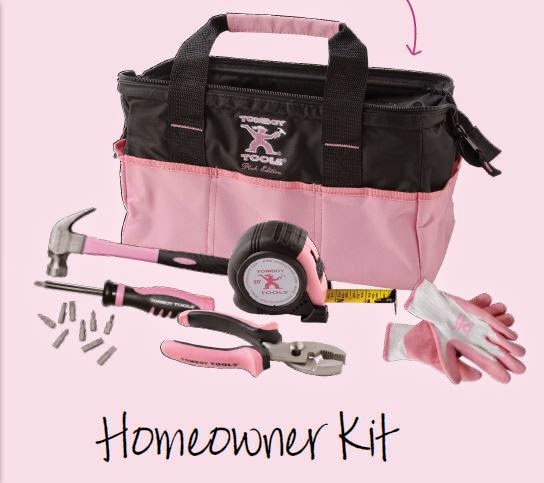
What is included in the Project  Home Home Owner kit? Five basic tools and a great canvas bag to carry them in.  These tools are what every homeowner needs from the first time buyer to the seasoned homebuyer purchasing their tenth home. And, these are not just any tools, these are Tomboy Tools a division of Project Home who strives to make their tools as light weight as possible with an ergonomic design. 

·         Pink/Black wide mouth canvas bag with zip closure

·         13 oz. Hammer is the perfect weight hammer for most, including a magnetic head and rubber grip handle 

·         16' Tape Measure includes metric and fracture markings for ease of measuring

·         Ratcheting Screwdriver is like having 10 screwdrivers in one with 10 bits in the handle with the ease of ratcheting for all of your home projects 

·         Slip Joint Pliers also include rubber grip handles

·         Pink/White Rubber Gloves are washable, come in two sizes and can be used in the garden.

Project Home is offering Real Estate Professionals the opportunity to purchase 5 Homeowner Kits embroidered with your name and phone number or maybe your website.  You have the option of adding two lines to this high-end, durable canvas bag with your information on the side of the bag.  What a great opportunity to continue to advertise your business while giving your customer a purposeful gift!

Have you heard of Project Home? If not, let me share a little information about who they are and why they are making a huge difference in the real estate industry. 

Tomboy Tools, now d/b/a Project Home was founded in 2002 with a mission of building confidence and empowering women through education and quality products. The company has its headquarters in Newark, Ohio. On August 1, The company will do business under the name Project Home™ with the tag line, "Making your vision real." The company will continue to use the brand name Tomboy Tools for its line of pink tools that are designed especially for women.

"We want to show women how to keep their homes organized, maintained and beautiful. In other words, we’re taking a much more comprehensive view of our mission than simply as a seller of pink tools."


August Special – Each Real Estate Professional joining Project Home will be in a drawing for one Home Owner kit to be given away.  For more information on how you can continue to advertise your business while providing a great gift to your clients, contact Toni Griffin, Project Home Consultant, at 217-412-0610 or email her at toniglovespink@comcast.net.

Toni Griffin has been a Project Home Consultant for 2 years.  She has always had a passion for remodeling, renovating and home improvement.  Along with her husband Phil, they have remodeled their home and most recently built Phil his own garage.  She can answer any questions about this incredible opportunity, the company or any tool.  Visit her website at www.theprojecthome.info/tonigriffin

Monday, October 28, 2013

Choosing Your Mortgage Lender: 5 Questions You Should Ask


All mortgage lenders are not the same. Not only do they offer different rates -- one study found that on a given day, mortgage rates can vary from .375% to .625% between lenders – they offer different experiences. Good lenders are highly professional and their loans progress quickly and smoothly. They want to understand your needs in order to make the right recommendations. The best mortgage lenders interview you thoroughly, complete your application quickly, and request everything they need from you upfront. Bad lenders call every other day for new documents, neglect to provide or explain the loan’s disclosures, or drop into black holes and stop returning your calls.


Naturally, you want a good lender and not a bad one. But how to you find a good lender?

First Things First: Rates, Ratings and Reviews


The most expedient way to vet a batch of mortgage lenders is online. Not only can you get a fistful of competitive mortgage quotes in a very short time, you can check out lenders’ reviews and ratings. 


You’d probably like dealing with the mortgage banker that got this review:


Fantastic Service!
We could not be more pleased with the way in which Joshua, our mortgage advisor, handled our refinancing. He patiently reviewed and explained all of our options, reworking scenarios when necessary, and walked us through every step of the way. He was always available, answered questions thoroughly, and made the process easy and even fun. I have already recommended him to a friend. Thanks so much!!

And you’d want to kick this mortgage broker to the curb:


Sky high closing costs!
I was charged an arm and a leg in costs and fees. I had an FHA loan and ended up paying almost 8% at closing. I will not recommend this lender to ANY acquaintance of mine. I was not explained that I was being charged points and given the "so called cheaper" rate. I did not even receive my
Good Faith Estimate until a week before the day of closing.

Next Things Next: 5 Crucial Questions

Once you’ve winnowed your list of lenders to two or three, you can interview the loan officers and mortgage brokers, making sure that you get someone whose communication style and personality is harmonious with yours. It’s difficult to discuss personal issues like your salary and child support arrangements with someone who makes you queasy. It’s much easier to talk money with someone you like and trust. Here’s what you need to find out:


·         Can I get a Good Faith Estimate today? Some lenders only give GFEs to people if they apply for a loan, while others provide the forms to anyone who asks. This demonstrates a higher level of customer service, and a GFE offers more consumer protection than a worksheet or scenario.


·         How quickly can I expect calls to be returned or my emails to be answered? Your lender’s communication style should mirror yours. You don’t want someone calling you during dinner about an email you sent that morning, or texting you about a rate change when you wish to be called.


·         Can I get my closing documents ahead of time and review them at home? This makes your closing smoother and takes some pressure off. If you don’t understand a provision in your loan, it won’t help if an escrow agent, Realtor and the seller are all there breathing down your neck and drumming their nails.


·         What is your procedure for locking in my loan, and will you keep me informed when mortgage rates change? You should be able to lock your loan over the phone, and you should receive written confirmation that your loan is locked.


·         What loan product do you recommend for me, and why do you recommend it? This is a biggie. Every loan product – FHA, hybrid ARMs, Community Homebuyer, etc. – is the best loan for someone. Don’t settle for a lender who automatically puts everyone in the same mortgage program because it’s easier.


You should be able to judge the loan officers expertise and helpfulness from these answers. Choose the person who puts as much effort into his or her work as you do!


Author Bio: Gina Pogol spent over a decade in mortgage lending, originating, processing and underwriting home loans. She has written about mortgage rates and finance issues for a number of publishers since 2006. Currently a senior marketing manager with Lending Tree, Gina advocates for consumers and loves answering their mortgage and personal finance questions.

Approves this article.


Sunday, May 26, 2013

Planting the Seed

How many of your past clients are you still in contact with? Do you have a relationship with them?  Do you call them to say hello, happy birthday, congratulations?  Why not?  This is your bread and butter and cream of the crop for business building.

Creating a system to keep in contact with your past clients you can plant seeds of suggestions.  By keeping touch with them you need to let them know how much you appreciate their business and for referring their family, friends and co-workers to you.  After all, they have already done business with you, so they know how detailed oriented you are and really worked hard for them in achieving their dreams.

If you are not staying in touch with your past clients, now is the time to start.  Send them a card or call them.  Explain to them it was a genuine honor to work with them and that it is important to you that you have satisfied clients.  Ask them if there is anything they need or you can do for them.  Offer a free home value analysis or to meet with them to evaluate their real estate portfolio, which means determine if they are in a position to buy or sell.   You could even talk to them about maybe considering a re-fi since the interests rates are low.  This could save them hundreds of dollars a month if they are paying high interest rates.

When you take the time to stay in touch with your past clients, you are planting the seed. It also gives them the confidence in referring you to others and brings them back to you when they are ready to buy or sell. 

Planting the seeds of suggestions is just that - a subtle reference to the idea of referral, especially with non-business contacts.  Use a "By the way..." indirect approach to avoid appearing pushy or desperate.  By implementing this technique not only helps develop contacts from friendships, but friendships from contacts.

Take a few minutes to write down how you will indirectly mention that your business is built on referrals.  Then start planting the seed. 

Need help in this area of your business?  Contact me so we can discuss how your system should be created so you can start building your referrals. 

Monday, April 29, 2013

How to Remember Maintenance Tasks? There’s an App for That!

Brightnest2
These days, we’re all busy with work, family and friends. There’s so little extra time left,  it’s human nature that some things just are not remembered. Like changing the batteries in the smoke-alarms or the filters in the HVAC system. You would do them if you remembered, right?

Now, perhaps you won’t have to worry about remembering. BrightNest is a free app for iPhone and iPads that organizes cleaning and schedules maintenance tasks for you.  After creating an account, or using Facebook, to sign in to the service, you’ll answer some basic questions and then the App is ready to work for you.

​BrightNest will suggest a variety of tasks for you to do, and provide an estimate of how long they’ll take, how hard they’ll be and a guide to how to get them done.  You can then add them to your schedule. If there’s a task not listed in the App, you can add it on the website itself.

Right now, BrightNest is only available for iOS, or through the web. The website includes a variety of excellent, time-saving ideas, from how to create a pallet garden to making small spaces work.
 
Like similar Apps, BrightNest is a way to simplify your life a bit.

This is a great app to share with your real estate clients. 

Kim Hughes
Real Estate Virtual Assistant
Business Consultant
www.KimHughes.com
Kim@KimHughes.com
903-569-6763

Tuesday, August 28, 2012

Real Estate Technology


The Real Estate business has changed in the last twenty years. Not fundamentally, of course. It’s still about communicating effectively with people. But, the technology of computers and the internet have changed the way we do business in a variety of ways.
The business is still about communicating effectively, which is ironic when you consider how confusing all the options can be. You, like so many other people, may be overwhelmed by technology marketing aimed at everyone and no one all at the same time.
Do I need a smart phone? Do I need a tablet? What is an app and which apps should I get? What about a website? A blog? Do I have to use Twitter? Why do I need a Facebook business page when I already have a Facebook page? How do  I send a text message?
If you’re not asking the questions above, chances are you did at one time. Chances are even better that you’ve heard Real Estate professionals asking those questions.
Take Your Time. If you’ve been in business for any amount of time, you probably don’t need to rush into adopting new technology. It’s always going to be best to take your time and get it right.
Don’t Worry. All of this technology is remarkably forgiving. If you do make a mistake, it’s not going to be the end of the world. If you get frustrated or lost, put it down, take a walk and then…
Ask Questions. Leverage your network to find out how your friends and co-workers are using a specific technology. Buy someone a cup of coffee and pick their brains. Take classes. Hire a computer geek to tutor you on the basics.
Why do I need any of this stuff?
The goal is to use this new technology to make your life more efficient and stress-free. Any other result is wrong! 
What stuff do I need?
Anything that’s going to make it easier for you to connect with and assist your clients is something you should consider. We at Kim Hughes& Company are experienced in and enjoy using various technologies that may be helpful for you to explore. Over the course of the coming weeks and months, we’ll take a look at individual technologies and give you reasons to consider adding it to your bag of tricks. And, if there’s something specific you want to know or if you have questions about using technology in Real Estate, let us know. We’re here to help you!


Friday, June 24, 2011

K.I.S.S. – Keep It Social Stupid

byonin
One of the oldest mnemonics in sales and advertising is K.I.S.S. – “Keep It Simple Stupid” – a reminder that in sales or traditional broadcast messaging you have a limited window to make your point, and that point needs to clear, concise, and simple in order to have the desired impact.
I recently read a post, which proclaimed, like so many others these days that “sales is dead”.  A statement that may be a little too strong to be accurate. But certainly we need to look for alternatives to traditional sales techniques in our online engagement as consumers grow ever more sophisticated. Likewise, in a world of peer to peer communication, broadcast marketing is challenged – its not yet dead, though it certainly is not as healthy as it once was. But with so much new content available to them, people are less inclined to pay attention to your message about your  about your product or service, because they are involved in more interesting conversations about topics that they really care about.
Today’s  connected world has created the need to re-invent K.I.S.S. as “Keep It Social Stupid”. We don’t live in a world of perpetual  Super Bowl ads so entertaining that people wait with bated breath to see our clever commercial messages. People don’t like ads for the most part, and with the interaction of Facebook, Twitter and FourSquare as alternative entertainment, people aren’t looking for  commercials or ads. They’re here to connect with others socially – and you forget that at your peril.
Businesses and business people that are successful online remember that their success will come from word of mouth recommendations  based on the trust they develop through their online interactions, not because they are the first, the biggest, or the best at what they do. A recent study showed that a Facebook like was worth almost three times a Tweet. The article suggests that this result occurs because  our Facebook friends most closely match our “real” friends, leading me to the conclusion that the social interaction was the keystone of the success. In fact in a recent infographic  from Spinback they share that 90% of all purchases are subject to social influence.
So if you want to be social – what do you need to do?
Listen – find out what your friends and communities are talking about – what they care about, and what interests them. Not what you think they should care about, but what they are actually talking about online.
Contribute – bring your insights to the conversation – add you thoughts, remembering that you do so for the benefit of others, not for a direct return to you in your business.
Curate or Create and share with the group, but do so in the context of the ongoing conversation, not in the context of your business needs. Consider what you curate or create,before you generate a stream of irrelevancies.  Using the information you glean during your listening to respond to the concerns, issues and interests of your community, Give careful thought to why your community might care about it and how sharing these items impacts them and your relationship with them.
Talk to People as individuals. It is impossible to understate how important it is to have conversations in this online space. Or how rapidly you increase the quality of a relationship by directly communicating on a one to one basis by replying to people on your Facebook page, making a quick response on a comment left on your blog, or mentioning someone by name in an online channel . It is here that connections can be made for the small business or professional and you can take a social contact and make them an advocate and evangelist for your cause, product, or service.
Following these simple guidelines  will build relationships with members of your online community. Those relationships in turn generate trust , allowing you to become positioned as a valued member of the community and a resource for its members, which gets you to your business purpose in a very easy and comfortable manner. Companies and professionals who fail to engage socially are doomed to low level attention from consumers at best, and complete anonymity at worst – so why settle for that? And engaging in social channels without being social is, as I have said before, like putting Lipstick on a Pig. Go out and do better – You have the potential to be great, and you don’t need to settle for anything less.

Saturday, January 15, 2011

Amber Alert and Facebook Take It To The Next Level.


U.S. Facebook users will now be able to receive AMBER Alerts — the notifications issued when a child is abducted — on the social network, the result of a new partnership with the National Center for Missing and Exploited Children. Details of the new program were made available Wednesday morning, one day before the 15th anniversary of the abduction and murder of 9-year-old Amber Hagerman, whom the alert system was named after

Read the rest of this article on how you can add your states Amber Alert to post on your Fan Page or Profile.

Friday, August 27, 2010

The Places You’ll Go – Google Places Uses Momentum To Grow


Do you use Google Places? Chances are, if you have ever looked up a business listing through Google, you’ve landed on Google Places. Also known as the Google Local Business Center, Google Places gives local business owners the opportunity to list address, phone, hours of operation and brief snippets about their business, as well as link to Google Maps.

Businesses can also show photos, respond to reviews and offer coupons, all for free. All that is required to get started is setting up a free Google account. For a flat fee of $25 per month, businesses can also participate in an advertising program called Google Tags that provides a way to call attention to the listing.

Google Places has more than 4 million local business using its service; Google sees more than 100 million visitors each month to Google Maps.

Enter Facebook Places. Facebook Places is a location-based platform that lets Facebook members check in from a local business and then tag friends to let them know where they are. Both services seek to connect local businesses with consumers.
So far, Google is all about the business, with no social connection; and Facebook is all about the user connection. As more businesses start to register with Facebook Places, expect to see advertising come into play. Google has strong momentum on its side, and analysts expect to see the search giant add social content before long. Social tools should create an interesting competition between Google and Facebook for small business ad share and consumer mindshare.

Tuesday, August 24, 2010

How to…Vyoo.it – Real Estate Listings Go Mobile


We all know how the iPhone and other mobile computing devices have changed the way we use the Internet. Did you know that Web (HTML) traffic visible through a browser is now only a quarter of all Internet traffic? That’s half of what it was ten years ago. The app rules, and we have the latest cool find in real estate apps.

If you’ve tried to read real estate listings on the Web with your mobile device, you know how hard it is to view on a small screen. Enter Vyoo.it, a new mobile marketing app that is designed to give you online listings via the mobile Web.

Your buyers are mobile. You want them to be able to get all the information they could possibly need on your property on the spot. The Vyoo.it app optimizes listing information, Web sites and virtual tours for a four inch screen. It can optimize any exiting listing and give it mobile ready landing page.

Vyoo.it also provides a short link and a QR code (a two-dimensional bar code) that you can post on Facebook, Twitter and other social media accounts with just a couple of clicks.

And the best part – it’s free. Expect to pay for advanced features down the road, but the standard app is free for now. Upcoming features include customized URLs and traffic analytics –be prepared to pay for those upgrades.

Vyoo.it uses Facebook’s single sign-on to register and log in. From there, all you have to do is provide a valid property address, a link to the online listing and some basic property information. Vyoo.it does the rest. Vyoo.it works best for iPhone and Android devices and they are creating optimized versions for Blackberry, Nokia and other smartphones.

Friday, August 20, 2010

Social Networking – How Sociable Are You?


As you read this, more than 10,000 Tweets just went out. According to the Social Computing Journal, social media grew more in 2009 than all previous years combined. Social networking sites have rapidly evolved into much more than a way to connect with family and friends – social media has become the channel for interactive, digital marketing and communications that brings businesses, consumers and communities around the world together as collaborators.

A recent article on the web describes this amazing tool, HowSociable.com. This tool is fun, easy and informative. Just enter the brand name of any business you’d like to track (including your own) on the HowSociable? home page. The tool will query a number of the top social networking sites and then display the results for the number of times the brand or business name showed up on each site. To see more detail about the visibility on a specific site, like Facebook People, you can click on the results icon and get additional information, even specific posts or comments.

You can use the tools to measure where you are with your social media plan, or give you a beginning baseline for measurement if you are just getting started. It also provides an easy interface to see collective results. Give HowSociable? your email address and the brand you want to track, and they can email you the results on an ongoing basis.

You can also use the tool to study the success of highly rated brands and check in on how your competitors are faring in the social landscape. HowSociable? is fun, it’s free and it’s a way to measure your social success stories. Try it, we think you’ll like it.

Tuesday, August 17, 2010

Build Your Campaign with Traffic in Mind – Try Google Analytics URL Builder


We all want to drive traffic to our Web sites, and search engine ranking and indexing has become an important part of our marketing efforts. SEO (Search Engine Optimization) and SEM (Search Engine Marketing) are hot topics, with keywords, meta tags, description lines part of our daily marketing vocabulary. We also want to track traffic, and many of us are use site analytics tools to determine where the Internet traffic goes to and where it comes from.

In making your site friendlier to organic (not paid) search results, don’t forget to improve the structure of the site URLs. We think carefully about the primary site URL and pay to procure domain names for our sites. But the URLs within the site are important too – each page has a unique one, and Google offers opportunities for you to better organize your site and make it easier for Internet ‘robots’ and ‘spiders’ to crawl the pages. In particular, Google has a great tool to help you manage promotional campaigns through Google Analytics URL Builder. You have to be a current user of Google Analytics to use the tool.

The free URL builder uses a simple online form to help you create and track URLs for the landing pages of your latest marketing campaign. Just enter in the primary URL (domain name) of your site and follow the easy steps on the form. Be clear and specific on each descriptive title you add to the builder – Google uses these titles to help you identify the traffic once the campaign is launched.

When you’ve completed each field, just click on the “Generate URL” button and the tool will create a tracking URL that you will use as the page link for the banner ads specific to this campaign.

To measure the traffic results of your campaign, log into Google Analytics and click on “Traffic Sources,” followed by “Campaigns.” Google then displays your traffic by each marketing campaign.

As with most things Google, we love that it’s free, simple and highly effective!

Tuesday, June 29, 2010

10-Attitudes-of-Success

This is a great article on creating a successful attitude. Enjoy and let me know what you think.

http://msn.careerbuilder.com/Article/MSN-666-Workplace-Issues-10-Attitudes-of...

Posted via email from Kim Hughes and Company

Thursday, May 20, 2010

Heard About SikkU? Check Out This Mobile Information Tool for Home Buying…


SikkU is a home buying/selling information tool that brings together mobile devices, online search and social networks for buyers, sellers and other real estate and mortgage professionals.

Here are just a few of its great features:

• Free to join
• Access to live real estate data.
• Check prices and other home information with your mobile device
• Get real estate information and listings
• Listings are complete: price, square footage, rooms/baths amenities and more.
• Change your search location to search other areas in the country
• Share your favorites and ideas with your family and your realtor
• Get real-time alerts for listings that match your criteria

SikkU also provides a dashboard tool that lets you customize your own personal tracker. The registration process is fast and simple – you can sign up in seconds. SikkU offers an SMS text service that sends info to mobile phones in seconds, 24x7 (where there is wireless coverage). With basic text keywords, users can search local homes for sale, request property information, get home values, property details and payment amounts. If you have a smartphone, you can use your Web browser to get instant information.

You can access SikkU’s home shopping tools from your home or office computers, from your mobile phone through SMS Text or through your mobile Web browser. The tools not only give you instant data and dashboard reporting, but they also work together to create a unique social networking site for the home buying and selling community. Check it out today at www.sikku.com.

Thursday, May 13, 2010

Protect Your Privacy From Data Mining


By now, we’ve all been conditioned to protect our Internet privacy when we make purchases online. Most people know to only use reputable sites, make sure they use encryption software, don’t give out too much personal information at once, never give out your social security number – the list goes on and on.


We’re even becoming a little more aware (sometimes learning the hard way) that we should exercise some restraint on our social media sites like Facebook, MySpace and Twitter.


What you may not know is that consumer sales organizations, including retailers, insurance companies and lenders, are very interested in your social media habits, profiles, blog comments and your social network of ‘friends’. Many of them are data mining social media sites and blogs to get a full personal profile of you and learn about your buying behavior through your social behavior.


One of the most talked about data mining services is Rapleaf, who claims to give retailers the ultimate in customer insight – by crawling through the most popular newsgroups, blogs and social sites – all unknown to the individual consumer. While lending and credit agencies swear that they only use factual data to determine credit decisions and scores, they still use social data to understanding consumer profiles – even looking at the credit worthiness of your friends or your followers on Twitter. After all, Twitterers of a feather, flock together.


Here are three important tips to keep your social pages from undermining your consumer rights:
1) Absolutely EVERYTHING you put on the Internet is public information. Period. Don’t let strict ‘privacy settings’ give you a false sense of security.
2) Choose your friends wisely. Don’t accept ‘friend’ invitations from random people you have never heard of or know only through friends of friends of friends. Your circle is being watched and mined for your connections.
3) Monitor posts on your account frequently and remove anything offensive.

Social networking and blogging is fun, friendly and here to stay. Just be mindful that your online conversations are big business for big brother retailer.

Wednesday, May 05, 2010

Broker Brain


Broker Brain software was developed by brokers, for brokers with great tools and features that help you manage your REO business from A-Z! Here are just a few of the asset management tools you get with Broker Brain:

• Secure access from any location
• Daily task lists
• Auto generated forms
• Full Online Document Storage
• Photo Storage with Auto Resizing
• Mapping Integration
• Advanced reporting tools
• Consolidated property information
• Real-time property information to prospective buyers
• Public Web site

Broker Brain also offers great support – comprehensive online documentation, free Web-based support, fee-based (per incident) phone support and onsite training. Broker Brain also provides options for importing your property data into the system.

Pricing is based on the size of your portfolio, and starts at $145 per month for up to 50 properties. Whether you are an individual, small brokerage house or large management company, Broker Brain has tiered pricing model that fits your business. Also check out the 30 day risk free trial – no obligation and no setup fees.

This module based software set offers a wide range of services for the REO broker – everything from HOA and multi-market support to tracking expenses. Broker Brain encrypts all data traffic so that your sensitive information is secure. The service also uses multiple hosting servers and provides regular back-ups by location. Don’t rack your brain over REO complexities – see if the folks at Broker Brain can put your mind at ease.

Thursday, April 29, 2010

Take Command of Your Short Sale Business – check out Short Sale Commander!

Trying to navigate through the uncharted territory of short selling? Are multiple deals slowing your workflow? We have a great new tool for you to check out – Short Sale Commander.

Short Sale Commander offers the following key features:

• Guest Access for non-users to view pertinent file information
• Centralized data access and a standardized process
• File sharing and document upload capabilities
• Automated document management and central storage
• Flexible reporting tools
• Time-stamped activity logs
• Paperless system

Whether you are a newcomer to the short sale market or an experienced pro tying to manage a short sale portfolio, Short Sale Commander offers an easy to use, easy to implement solution that helps agents, investors and brokers better manage the short sale business from a single, central system.

We also like that you can test drive the product yourself before committing – they are currently offering a 14 day free trial. Priced for all budgets and offices, we see this as a productivity tool that can’t miss for the price. They also offer a free demo video – all you have to do is complete a simple contact form.

Elk Software is a software development company that specializes in Web management platforms for professionals in the real estate and title industries. Their value prop states that Short Sale Commander is the first in the industry to focus on the internal organization and workforce collaboration for managing short sale negotiations.

If you’re ready to look at productivity tools for your distressed property and short sale business, then take command of the situation and visit www.shortsalecommander.com. Also be sure to check out their blog!

Thursday, April 22, 2010

Backing Up Your Tweets


Twitter is an effective and fun tool, it can be used for your business as well as personal connections. Some people spend a substantial amount of time and energy into their tweets. So what would happen if all the time that you spent on Twitter, all the great stuff you sent out, all the followers you’ve gathered were to suddenly disappear? For a lot of people who are hooked on Twitter it would be a nightmare.

Have you ever thought about backing up your tweets? If not reading the above statement about what could happen if you don’t may make you change your mind. Backing up your Twitter can be simple and free. Here are a couple different programs that can keep you tweeting even if something happens to your account.

BackupMyTweets.com
Their tagline “Don’t lose your Tweets. Make Them Permanent” and that’s exactly what they do. With this service you can protect your tweets, do daily backups, and they offer flexible download options. The basic service is free but you can also get a Premium Edition $4.95 a year, pretty cheap for all that it does. BackupMyTweets.com also offers a suite of other programs such as BackupMyMail and BackupMyBlog.

TweetBackUp.com
TweetsBackUp is easy to use and it does daily backups but what makes it really stand out is that it’s all web based. No installation of extra programs on your computer to bog it down.

Tweetake.com
Tweettake makes possible users aware of just what can happen when Twitter malfunctions. On their about page under “Why bother to do this?” They state that Twitter may lose followers again like it did in June/July. If you are backing up your tweets you won’t be the one that’s scrambling to get them back.

Thursday, April 15, 2010

How to Prepare for a Disaster Using Social Media

It could happen at any time, you could be running your daily errands. Your oldest is at school and youngest at daycare. Your husband or wife is in another city 400 miles away at a conference. You go into the store to buy milk while your walking to the register to check out it happens, an earthquake. Once the initial shock is over your mind is spinning. What do you do next?

Preparing for a disaster is something we all need to do to make sure that our family is safe and technology is there to make it possible. Within minutes we could contact our husband and children to make sure they are ok, find a local shelter to get everyone to, make sure you can find the safest route to all the destinations that you need to get to.

To use social media and technology as a guide to getting through a natural disaster you need to know where to start. First step is to make a plan and involve your whole family in it. Make sure everyone has all the vital information in their electronic devices that they need. Phone numbers, addresses, email address, etc. Check with your children's school to see what their plans are for natural disasters. Have a meet up place if your children are older so they know where to meet in case of an emergency. This is a great project for your virtual assistant to help you with so your family is prepared as well as you business associates.

Disasters can strike at any time and using technology can keep you connected. For more information check out this great article from wonderful guide HOW TO: Prepare for Disasters Using Social Media.

Wednesday, April 07, 2010

Top 10 First-Time Homebuyer Credit Tax Tips

I received the below article today and thought was a great post!  Please feel free to retweet, reblog, etc.  Let's get the news out that the deadline is approaching.


IRS Special Edition Tax Tip 2010

Top 10 First-Time Homebuyer Credit Tax Tips 

There is still time to claim the First-Time Homebuyer Tax Credit on your 2009 tax return. If you purchased or entered into a binding contract to purchase a home in 2009 or early 2010, you may be eligible to claim the First-Time Homebuyer Credit. Claiming this credit might mean a larger refund. Here are 10 things the IRS wants you to know about the First-Time Homebuyer Credit and how to claim it.

1.     You must buy – or enter into a binding contract to buy – a principal residence located in the United States on or before April 30, 2010. If you enter into a binding contract by April 30, 2010, you must close on the home on or before June 30, 2010.

2.     To be considered a first-time homebuyer, you and your spouse – if you are married – must not have jointly or separately owned another principal residence during the three years prior to the date of purchase.

3.     To be considered a long-time resident homebuyer, you and your spouse – if you are married – must have lived in the same principal residence for any consecutive five-year period during the eight-year period that ended on the date the new home is purchased. Additionally, your settlement date must be after November 6, 2009.

4.     The maximum credit for a first-time homebuyer is $8,000. The maximum credit for a long-time resident homebuyer is $6,500.

5.     You must file a paper return and attach Form 5405, First-Time Homebuyer Credit and Repayment of the Credit with additional documents to verify the purchase. Though you cannot file electronically, you can still use IRS Free File or tax-preparation software to prepare your return. The return must then be printed out and sent to the IRS, along with all required documentation.

6.     If before May 1, 2010, you enter into a binding contract to purchase a home before July 1, 2010, and you are claiming the credit, attach a copy of the pages from the signed binding contract to make a purchase showing all parties' names and signatures, the property address, the purchase price and the date of the contract. 

7.     New homebuyers must attach a copy of a properly executed settlement statement used to complete such purchase. Generally, a properly executed settlement statement shows all parties' names and signatures, property address, sales price and date of purchase. However, settlement documents, including the Form HUD-1, can vary from one location to another and may not include the signatures of both the buyer and seller. In areas where signatures are not required on the settlement document, the IRS encourages buyers to sign the settlement statement when they file their tax return -- even in cases where the settlement form does not include a signature line.

8.     Buyers of a newly constructed home, where a settlement statement is not available, must attach a copy of the certificate of occupancy showing the owner’s name, property address and date of the certificate.

9.     Purchasers of mobile homes who are unable to get a settlement statement must attach a copy of the executed retail sales contract showing all parties' names and signatures, property address, purchase price and date of purchase.

10.   If you are a long-time resident claiming the credit, the IRS recommends that you also attach documentation covering the five-consecutive-year period such as Form 1098, Mortgage Interest Statement or substitute mortgage interest statements, property tax records or homeowner’s insurance records.

For more information about the First-Time Homebuyer Tax Credit and the documentation requirements, visit IRS.gov/recovery.


Links:


YouTube Video:

New Homebuyer Credit - Claim It:  English | Spanish | ASL


Posted via web from Kim Hughes and Company

Tuesday, April 06, 2010

Check out NutShellmail To Stay Informed on Your Social Networks

Here is a great FREE program that I have been using for so long and really love it.  It saves me so much time in knowing what is going on with my social networks.  You have got to try it out yourself!

NutShellMail


NutshellMail: Simplify Your Online Social Life from David Lyman on Vimeo.

Facebook:

Get all your Facebook Birthdays, Photos, Friend Requests, Wall Posts, News Feed, Event & Group Invites, and Messages in one interactive email.

Control Facebook right from your inbox -- you can comment, reply, post on walls, and update your status without leaving your email.

Twitter:

See your mentions, new followers, quitters, and your friends' latest tweets in your Twitter summary. Tweet, Reply, Retweet, and DM without leaving your inbox.

Posted via web from Kim Hughes and Company